This is what a paid report looks like, except that this one was free: it is the two jam comments I left on AFTERLIGHT: The Beginning of Apocalypse, put back together with the evidence behind them. Nothing is anonymised, because it was all public on itch.io already. The developer fixed everything in it, and that is noted under each bug.
Summary
Four bugs over two sessions. One high (a late-game choice makes itself, which locks off an ending), two medium (a documented key that does nothing; itch’s page buttons covering the party health bars), one low (the click that gives the game focus also fires a shot). Zero console or page errors on desktop in any run. Movement, interaction prompts, the pause menu, autosave and Chapter Select all held up.
| # | Bug | Severity | Status |
|---|---|---|---|
| 1 | TAB (listed as “six rules”) does nothing | Medium | Fixed by dev 22 Oct, re-tested by me 23 Oct |
| 2 | itch page badges cover the party health bars; page scrolls sideways | Medium | Fixed by dev 22 Oct, re-tested at three sizes 23 Oct |
| 3 | The focus click counts as a shot | Low | Dev reports fixed; unconfirmed by me |
| 4 | Level 7 Dawn farewell choice picks itself | High | Fixed by dev 29 Oct, fix verified in the decompiled code |
Severity: High blocks progress, content or an ending, or loses data. Medium means a documented control or screen doesn’t work, or the UI is unusable at a common size. Low is cosmetic or a small annoyance.
Setup: Chrome on one Windows PC, driven by Playwright with real keydown, keyup, mouse and touch events. Session one on 22 October at 1280x800 desktop and Pixel 7 portrait (412x839). Session two on 26 October, build 19948111, in a 1366x900 window with the game frame at the itch default 960x540.
1. TAB does nothing, though the page lists “TAB six rules” Medium
- Where
- Level 1, apartment 4C, in free roam and mid-dialogue; also Level 7 “The Signal” via Chapter Select.
- Steps
- New Game, or Chapter Select then “L7 · The Signal”.
- Click the game once so it has keyboard focus.
- Press TAB. I tried a tap and a hold of about 0.9 s.
- Press Esc straight after, to prove keys are reaching the game.
- Expected
- The City Emergency Notice with the six rules, as the page’s controls list promises.
- Actual
- Nothing. The frame is the same scene before and after (I hashed the screenshots; only the idle animation moved). Esc opened the pause menu right after, so input was fine. The in-game corner hint listed only ESC MENU and M MUTE.
- Screen size
- Desktop Chrome, 1280x800 window.
- Screenshot
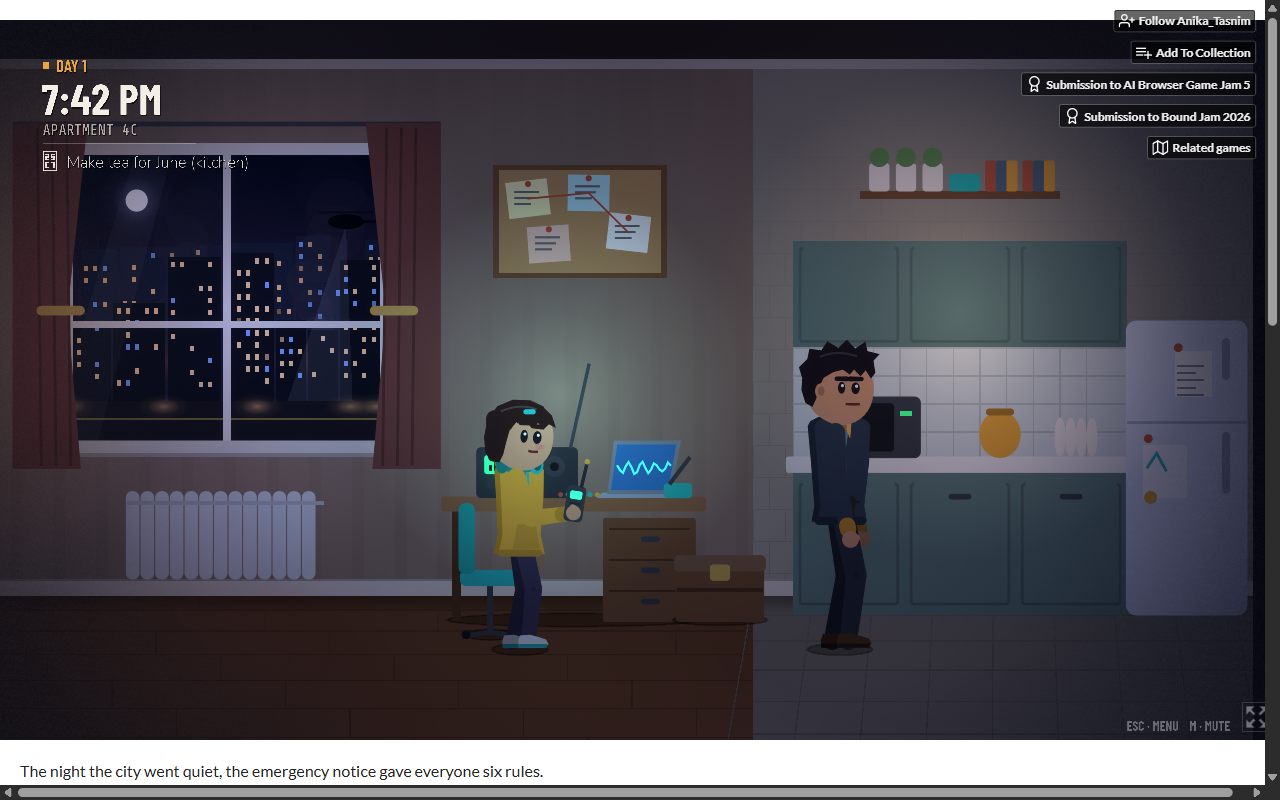
After TAB at 1280x800: no notice, hint bar shows ESC and M only. - How I verified
- Four presses across two game states, each with a screenshot before and after; the page’s own controls text saved from the itch page. Reported as a bug, not a guess, because the page documents the key.
- Fix
- Developer: “Fixed all three in the latest build” (thread). I re-tested on 23 October at 1280x800: holding TAB in Rooftop Extraction brought up the full notice with all six rules, and on Day 1 before the notice it says the notice arrives later tonight. The hint bar now lists TAB.
2. itch’s page buttons sit on top of the party health bars, and the page scrolls sideways Medium
- Where
- The itch.io game page, top-right of the game frame. Worst in Level 7, where June, Theo and Mara’s health bars live there.
- Steps
- Open the itch page in a 1280x800 window and load the game.
- Chapter Select, then “L7 · The Signal”.
- Advance three lines so the HUD appears.
- Expected
- The embed fits the page width; the HUD is readable.
- Actual
- The embed was wider than the page (document 1280 px inside a 1265 px viewport), so the page scrolled about 15 px sideways, and itch’s Follow, Add To Collection, two jam badges and Related games buttons sat directly on the June / Theo / Mara bars. On the title screen the same buttons covered the top-right of the art, and on the new Chapter Select list they covered “2 - Checking the Building” and “4 - The Emergency Rules”.
- Screen size
- Desktop Chrome, 1280x800 window.
- Screenshots
-
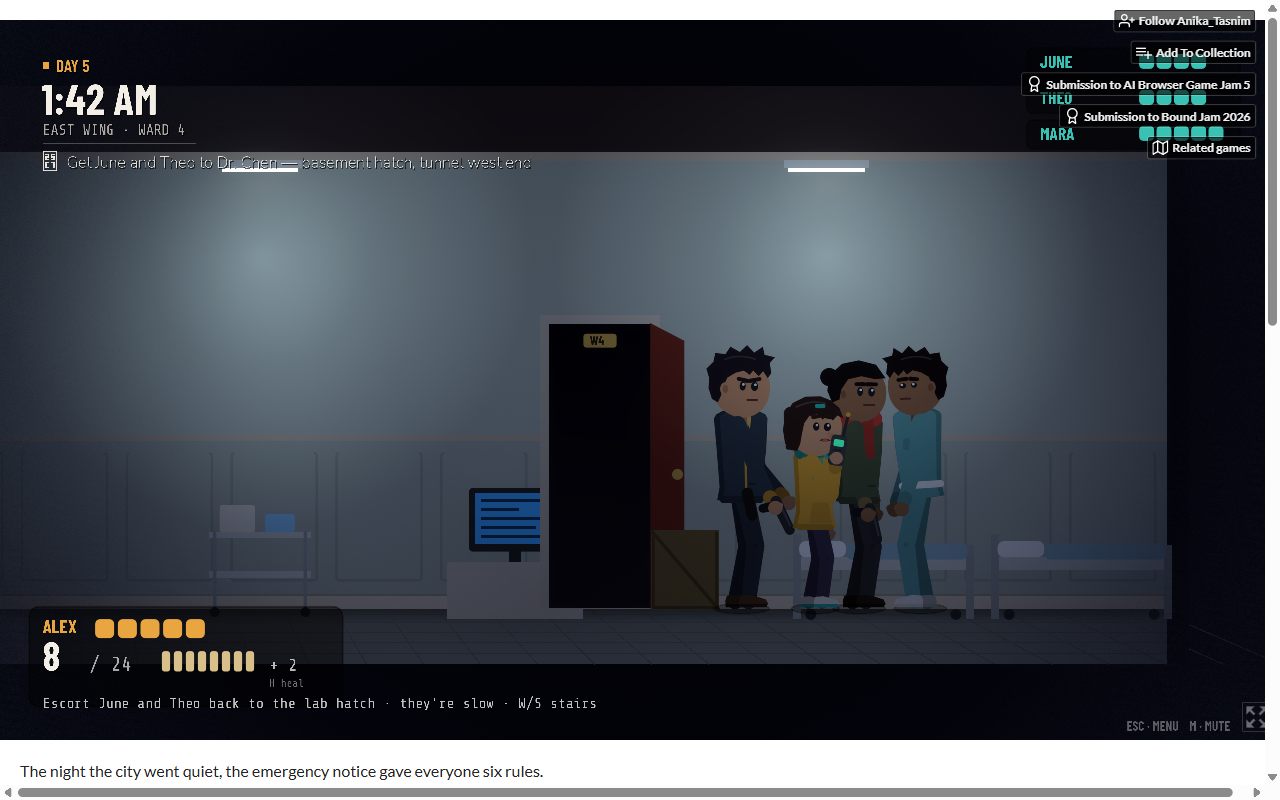
Before: itch’s buttons on the party bars; the ammo counter reads 8 / 24 bottom-left. 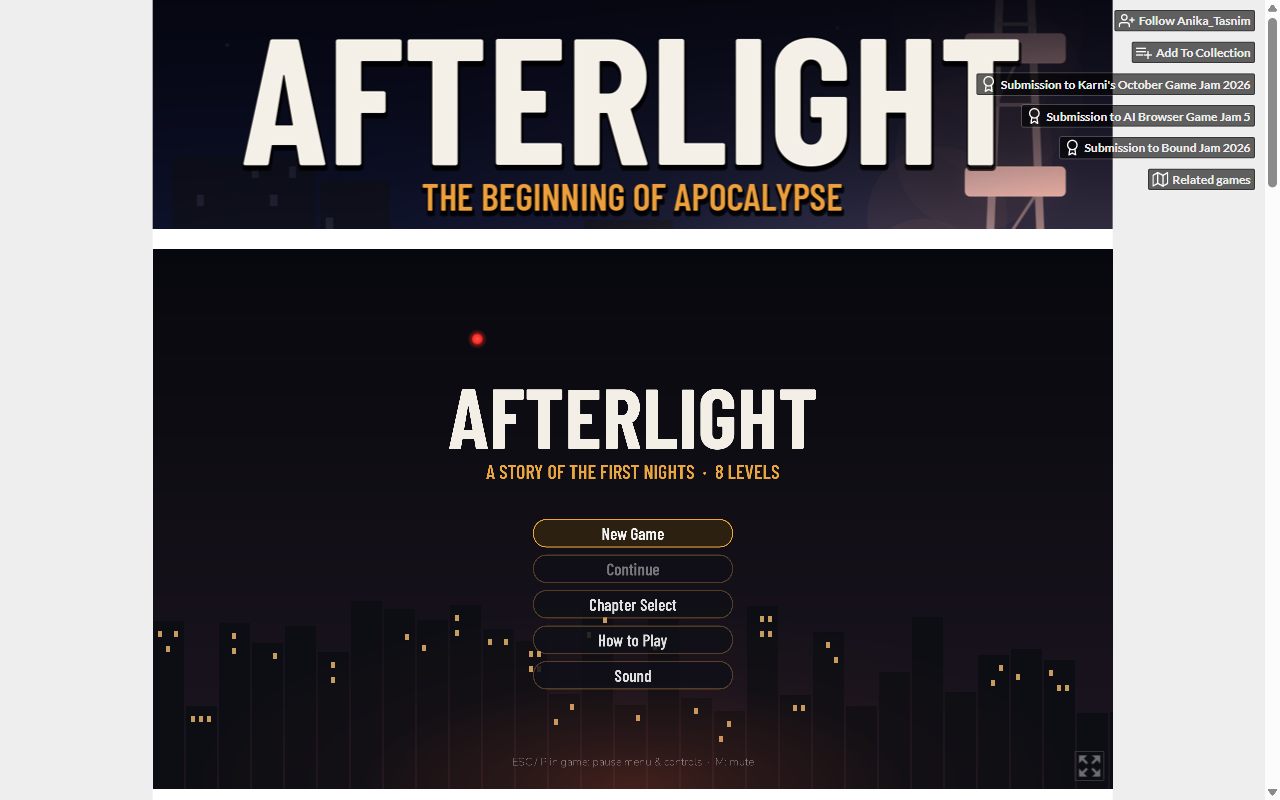
After the fix: embed at 960x540 under a banner, buttons beside the banner, no sideways scroll. - How I verified
- Measured the document width against the viewport, and took the screenshot with the HUD up. Re-checked on 23 October at 1280x800, 1366x768 and 1920x1080.
- Fix
- Developer set the embed to 960x540 and added a banner above it (thread). I confirmed on 23 October: no sideways scroll at any of the three sizes, and the badges sit next to the banner, clear of the game and the chapter list.
3. The click that gives the game focus also fires a shot Low
- Where
- Level 7 “The Signal”, any shooting scene.
- Steps
- Chapter Select, then “L7 · The Signal”. Advance to the HUD (ammo 8/24).
- Click anywhere on the canvas to give the game keyboard focus. Do it twice.
- Expected
- The focusing click is swallowed; ammo stays at 8.
- Actual
- Each click fired a round. Ammo went from 8 to 6.
- Screen size
- Desktop Chrome, 1280x800 window.
- Screenshot
- The “before” state is the HUD in the first screenshot under bug 2 (8 / 24). The count after the two clicks was read from the HUD in the run log; I didn’t keep a separate frame of it, which is why this one is the weakest on evidence and is marked low.
- How I verified
- Two focus clicks, ammo counter read from the HUD each time.
- Fix
- Developer reports it fixed with the other two. On my 23 October re-test I didn’t get into a shooting scene, so I said in the thread that I couldn’t confirm it either way. Still unconfirmed by me.
4. The Level 7 Dawn farewell choice picks itself High
- Where
- “L7 · Dawn”, Harbor Point roof, after the third case goes on the helicopter.
- Steps
- Chapter Select, then “L7 · Dawn”.
- Carry all three cases to the helicopter.
- When Sgt. Hale’s bark starts (“Three. That’s all of them.”), take your hands off the keyboard and watch.
- Expected
- Each farewell line waits for SPACE; the two-option choice waits for 1 or 2.
- Actual
- Every line advances on its own with no SPACE prompt. The two options flash up, and about a second later Alex says “Not this time. I’m taking my sister home.” (option 1) without any input. Option 2, “After June’s safe, I’ll come”, can only be chosen by hitting 2 inside that window, so the “joined recovery” branch of the epilogue is close to unreachable. Level 8 waits for SPACE normally, because the stuck flag clears on the scene change.
- Screen size
- Desktop Chrome, 1366x900 window, game frame at the itch default 960x540.
- Screenshot
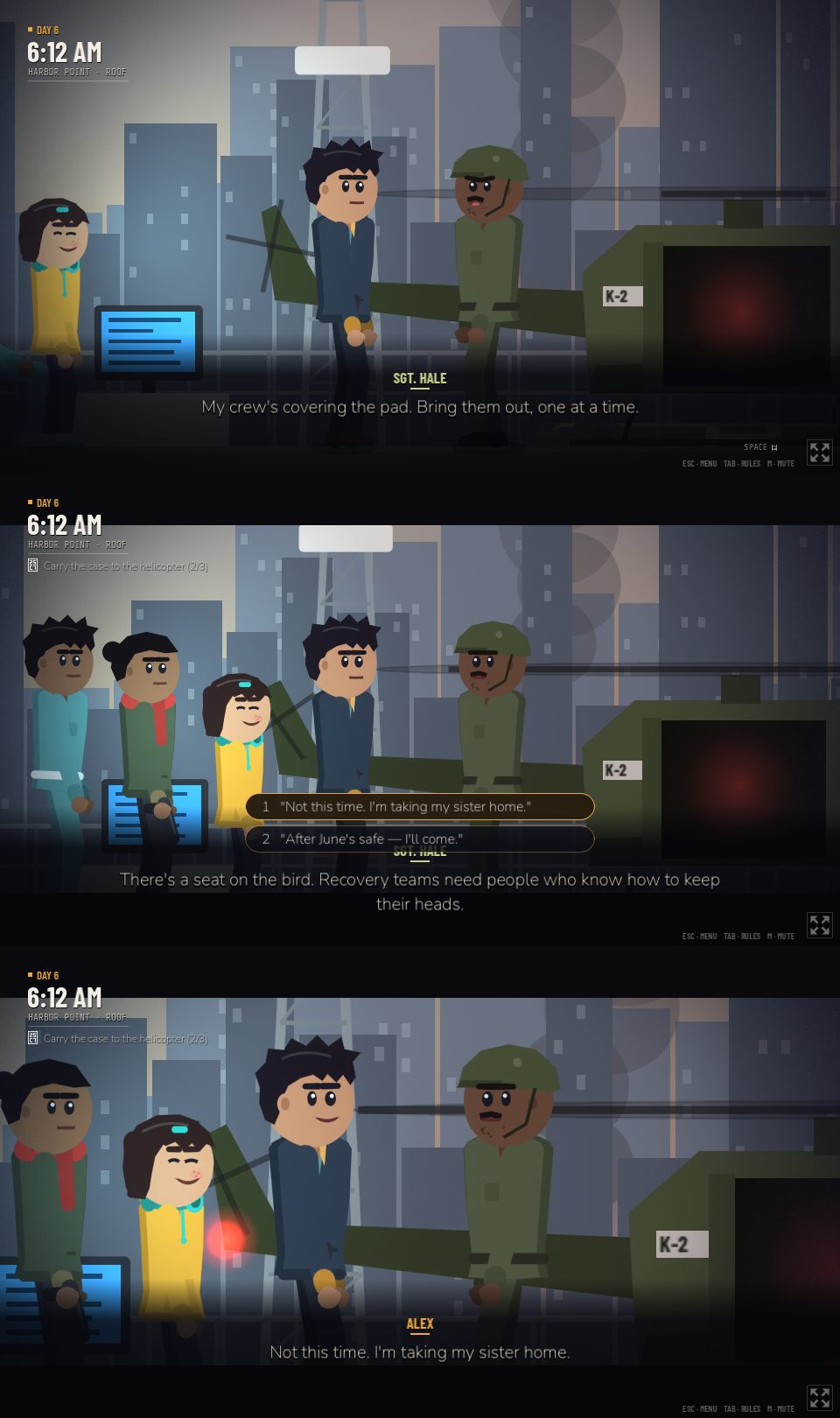
Three frames from the hands-off run: Hale’s line, the choice, and Alex’s auto-picked answer about a second later. - How I verified
- A scripted run on the live build with no key or mouse input after the third case, screenshotting the frame every two seconds (45 frames). Then the cause, from the decompiled scripts (the Godot
.pckopened with GDRE):bark()savesui.auto_advance, sets it, and only restores it “if not Inputs.input_locked” (level_base.gd:105);_farewell()locks input right as the bark starts (signal.gd:520); soauto_advancestays true, andchoose()auto-picks after 1.2 s whenever it is set (cinema_ui.gd:366). Zero console errors. The suggested fix in the comment was marked as a suggestion, not tested. - Code-only note
- The subway phone scene looks like the same pattern (silencing the phone while Mara’s “Kill it” line is up). I said I hadn’t played it, and counted it as a note, not a bug.
- Fix
- Developer, 29 October: “Fixed: barks now always restore normal dialogue, and conversations always wait for SPACE, so the Level 7 choice (and the joined_recovery ending) is reachable again” (thread). I pulled the new build and read the changed code:
bark()now setsauto_advanceback to its default every time, and the dialogue runner resets it before every line and choice. That covers the subway phone case too. Verified in code, not replayed live, and my reply says so.
Phone note, not counted as a bug
Pixel 7 portrait, 412x839, Chrome with touch: the itch page loads, the frame loads, the main menu is readable, but the canvas renders as a letterboxed strip in the middle third of the screen and the page logs one error, screen.orientation.lock() is not available on this device. The page does not claim phone support and the controls are keyboard and mouse, so this is a note for the developer, not a bug against the game.
What worked
- A/D and arrow-key movement, with context prompts changing as Alex walks (fridge, counter).
- E to interact, including hold-to-confirm; the tea scene and its objective update.
- The ESC pause menu (Resume, How to Play, Sound, Restart Checkpoint, Main Menu) opening and closing cleanly.
- Autosave: Continue lights up after quitting to the menu.
- Chapter Select straight into Level 7 with the right party, HUD and objective.
- Zero console or page errors on desktop across every run on both days.
What this cost the developer
Nothing. It was a free jam comment. The paid version is the same report, for your build, within 24 hours.